Overview
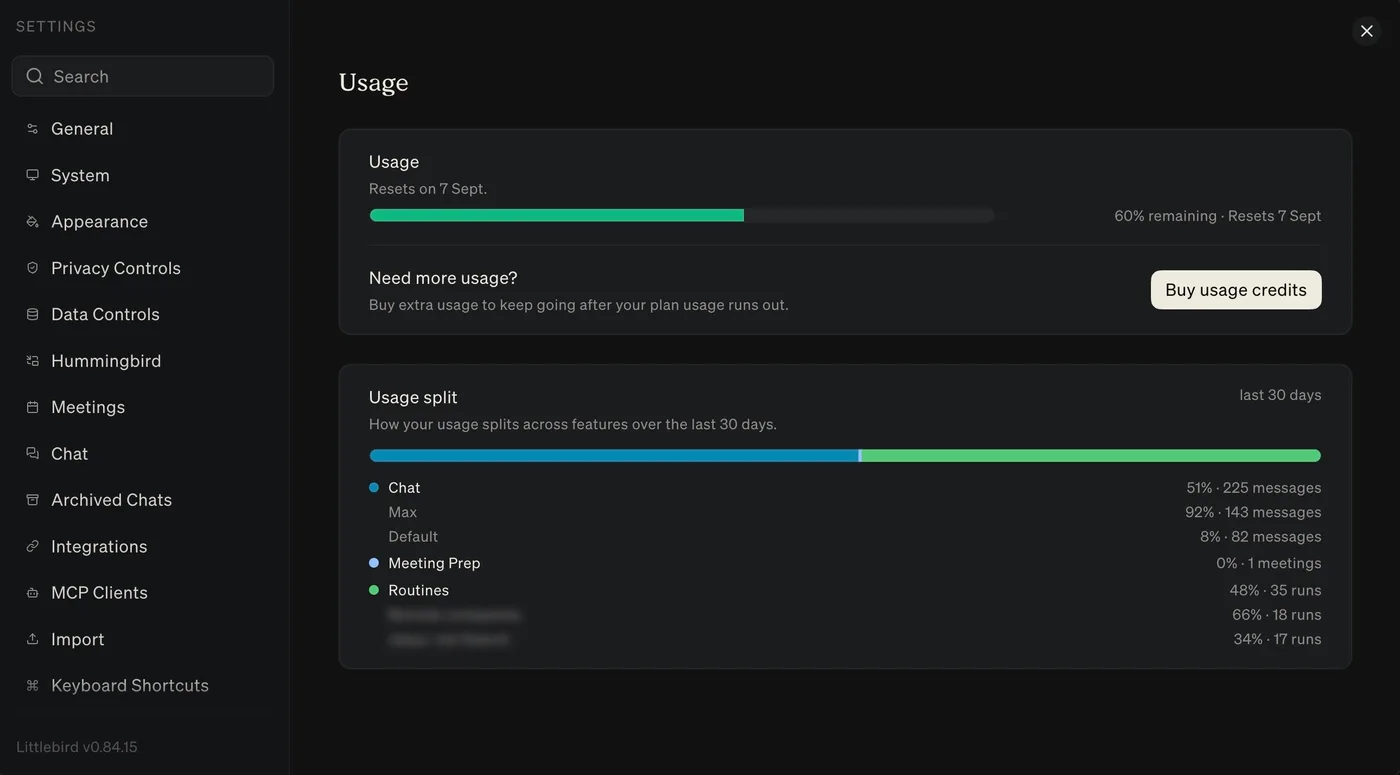
See remaining Littlebird usage, when it resets, and how the last 30 days split across Chat, Meeting Prep, and Routines.
Littlebird tracks the work it does, so you can see what you have used and what remains.
How usage works
Your plan includes a pool of usage that resets monthly. Open Settings → Usage to find:
- A usage bar showing how much remains and when it resets
- Usage split for the last 30 days, across Chat, Meeting Prep, and Routines
- Any usage credits you have already bought
- Buy usage credits if you need more after the plan allowance runs out
Chat usage is broken down by mode, such as Max and Default. Routine usage is broken down by each routine.
If you need more, you can buy usage credits at any time. They don’t expire, and they don’t require you to upgrade to a higher subscription tier.
Tips for getting the most out of your plan
- Start fresh for new topics. A message in a long thread costs more than a fresh chat. When you’re done with a topic and don’t need that context anymore, open a new conversation.
- Plan before you send. A well-structured first message with clear context, format, and outcome gets you there in one or two replies instead of five.
- Batch related questions. Combine multiple related asks into one message rather than sending them one at a time.
- Let memory work for you. Reference earlier context rather than re-explaining it. The more you use Littlebird, the less setup you need.
If something looks off
If anything about your usage seems broken or unexpected, reach out to us at support@littlebird.ai.