Microsoft Teams and more integrations

You can now connect Microsoft Teams. Littlebird can then read your Teams chats, channels, meetings, transcripts, recordings, and shared files, so the conversations that happen in Teams are part of what it knows.
Teams joins a longer list of new integrations:
- Google Tasks, so follow-ups can land in the task list you already use
- Pipedrive, Apollo.io, Clay, folk, lemlist, and Streak for sales and outreach work
- Datadog, Metabase, and Snowflake, with guided setup, for the numbers behind your work
- Apple Notes on your Mac
- Obsidian with more than one vault in a single connection
Open Integrations → Connectors in the sidebar, find the app, and select Connect.
Routines that start from Gmail
A Routine no longer has to wait for its schedule. It can now run when something happens in Gmail, including when you send an email. For example:
- When a customer emails about a renewal, pull together their recent threads and meetings and draft a reply.
- When you send a proposal, summarize what you promised so it is ready for your next call with them.
Schedules got more flexible too. A Routine can run every few minutes or at a set interval, and advanced schedules let you describe more specific patterns. Pro users can run a Routine in Ultra mode.
Edit a message, queue the next one
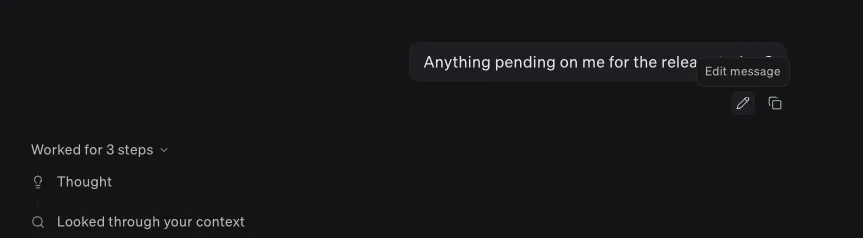
You can now edit a message you already sent in Chat. Littlebird answers again, and you can switch between the original answer and the new one.
While Littlebird is still working, you can type your next message and queue it. It sends when the current reply finishes, or you can interrupt the reply to send it right away.
Chat also takes any file type up to 30 MB, including videos, audio files, and archives.
You can also ask Littlebird for a one-off reminder. It already knows what you have been working on, so you can describe the task the way you would to a colleague:
Improvements
- Meeting
Littlebird labels the speakers in a meeting transcript, and you can rename them. When the meeting is on your calendar, it suggests names from the attendee list.
- Meeting
You can choose how far in advance automatic meeting prep starts, and skip automatic prep and summaries in meeting settings.
- MeetingMeeting prep updates when its calendar event moves to a new time.
- Meeting
The Meeting Notes sidebar filters your meetings by project and by recurring event.
- Meeting
If another meeting starts while you are recording, or you move to a different Meet or Zoom room, Littlebird asks whether to switch. Switching starts a separate note for the new meeting.
- Meeting
You can exclude a website, as well as an app, from automatic meeting detection.
- Meeting
Meeting notes open on the Transcript tab, with chat in a docked side panel that you can resize.
- Meeting
A new note opens as soon as you start one. If a recording stops unexpectedly, Littlebird tells you why, and offers Resume Recording when it stopped for inactivity.
- Meeting
A meeting summary can appear without taking keyboard focus. Control this in Settings → Meetings.
- ProjectsShared projects show meetings that other members add.
- Google Calendar
When Littlebird creates a calendar event for you, your RSVP is set to accepted.
- Chat
Voice Mode starts from the send button when the composer is empty. While it waits for an answer, you hear the occasional bird chirp instead of a thinking loop.
- Chat
Dictation adds clearer punctuation and drops false starts, repeats, and spoken corrections when AI cleanup is on. It uses your custom vocabulary for names and product terms, and you can choose the microphone.
- Chat
You can copy a reply as an image, type emoji shortcodes such as
:smile, and mark a chat as unread. - ChatThe composer supports rich text formatting, including strikethrough.
- Chat
Turn on Previous turn chat preview to keep part of the last turn in view while a new reply streams in.
- ChatSteps appear as soon as Littlebird starts using a tool.
- Chat
Chat tabs show when a chat is unread or still working. Tabs you have not used for 7 days close on their own.
- Image generation
You can download all generated images at once, as one zip file.
- Chat
A new + menu starts a chat or a meeting note from any screen and shows the recording in progress.
- Chat
Littlebird can sign in to websites with logins you save in Settings, without showing the password in chat. When a site needs you to sign in yourself, the task pauses and picks up again afterwards.
- Integrations
When an integration you have connected can do a task, Littlebird uses it instead of the browser.
- Integrations
The integrations catalog has category tabs, an Installed tab, and search.
- Integrations
Reconnecting an expired integration reconnects that exact account.
- SlackLittlebird can read and send files through Slack.
- Skills
You can edit a skill’s name, description, and instructions directly, and share a skill with your team. Teammates turn on the skills they want, and the owner can turn one on for everyone.
- Routines
Shared Routines keep their schedule, mode, icon, and Gmail trigger when a teammate adopts them.
- Routines
Running a Routine manually no longer waits through a cooldown, and Find works in Routine chats.
- Projects
Drag chats onto a project in the sidebar to add them, and drag files into Project Files to upload them. A new project gets a suggested icon based on its name.
- ProjectsPeople you add to a shared project get an email to let them know.
- ArtifactsArtifacts are now called Library throughout the app.
- Context
You can turn off context collection from the profile menu, and it stays off after a restart. You can also delete context for a date range you pick on a calendar.
- Context
Littlebird removes US Social Security numbers from captured text and leaves browser password pages out of your context.
- Teams
Team admins can manage app capture, transcript retention, excluded meetings, and allowed chat modes from Data controls.
- Usage
Usage settings show how much of each plan pool you have used, with a progress bar and its reset date.
- Hover
The Hover voice shortcut is available to everyone who uses Hover, and holding to talk works with any global shortcut.
- macOSYou can pick a theme preset for the desktop app.
- macOSSearch finds files on your computer by file name.
- macOS
Settings opens as a full page with section navigation. You can choose the notification sound in Settings → System, and switch app text to the OpenDyslexic font in Appearance.
- macOS
Downloaded updates install after five minutes of idle time, never during a chat, meeting, Voice Mode, or dictation. You can also start an update yourself and follow its progress.
- macOS
Checkout, the billing portal, and credit pack purchases open in your browser.
- WindowsOn-device MCP servers work on Windows.
Fixes
- Meeting
Fixed a recording started during a meeting carrying on after the meeting ended.
- Meeting
Fixed recordings failing to start right after your Mac wakes, and the “Meeting is already being recorded” error after a start timed out.
- Meeting
Fixed a resumed recording stopping when you had moved the meeting to a different app or browser.
- Meeting
Fixed meeting transcripts rewinding while recording and shifting when two people talk at once.
- Meeting
Fixed meeting detection resetting when Littlebird regained focus, and matching a recording to an older, longer calendar event instead of the one that had just started.
- Meeting
Fixed meeting reminders reappearing after you joined or started recording.
- MeetingFixed opening a link from meeting prep closing the prep.
- MeetingFixed source tags showing in meeting summary action items.
- Meeting
Fixed opening a second Littlebird window resetting meeting settings and clearing notifications.
- Chat
Fixed replies occasionally missing parts of their text while streaming.
- Chat
Fixed copied content pasting as raw Markdown, and pasting from Word inserting an image instead of text.
- ChatFixed long quotes overflowing their message bubble.
- ChatFixed Voice Mode starting on low background noise.
- Gmail
Fixed sending email to recipients written with a name before the address.
- GmailFixed Gmail links opening your inbox instead of the conversation.
- HoverFixed messages sent from Hover scrolling out of view.
- macOSFixed Littlebird closing by itself after an update on some Macs.
- macOSFixed Apple Mail not being indexed on macOS 14 and macOS 15.
- macOS
Fixed the main window becoming unreachable in fullscreen when Littlebird was set to show in the menu bar only.
- macOSFixed opening a PDF link sometimes closing the app.
- macOS
Fixed Apple Calendar events staying in Littlebird after you disconnected Apple Calendar.
- WindowsFixed notification sounds not playing on Windows.