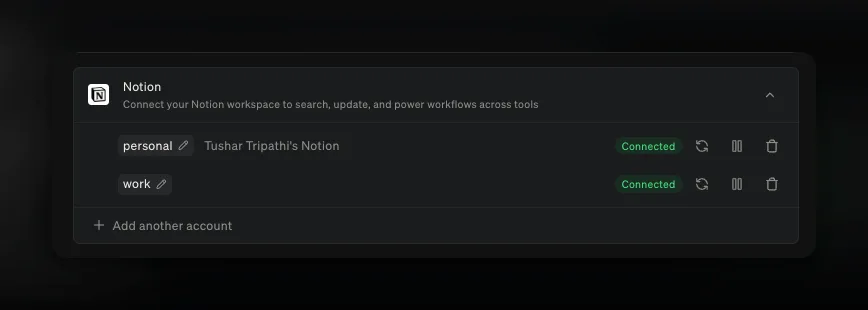
You can connect several accounts of the same integration, so your work and your personal life do not have to share one connection. Add two Gmail inboxes, both of your calendars, a second Slack workspace, or two Notion or Linear workspaces, then ask for the one you mean: “check my work inbox for anything from the Acme team”.
Open Settings → Integrations, choose an integration, and select Add another account. Littlebird names each one from the account you signed in with — the Notion workspace, the Slack team, the email address — and uses that name when it decides where a request should go. Rename any of them with the pencil beside the name. Each account keeps its own controls, so you can pause, remove, or reconnect one without touching the others.
For the current path and account controls, see the Integrations guide.
#8013#9056#9097#7870#9191#9369App Mentions - Tag an app with @
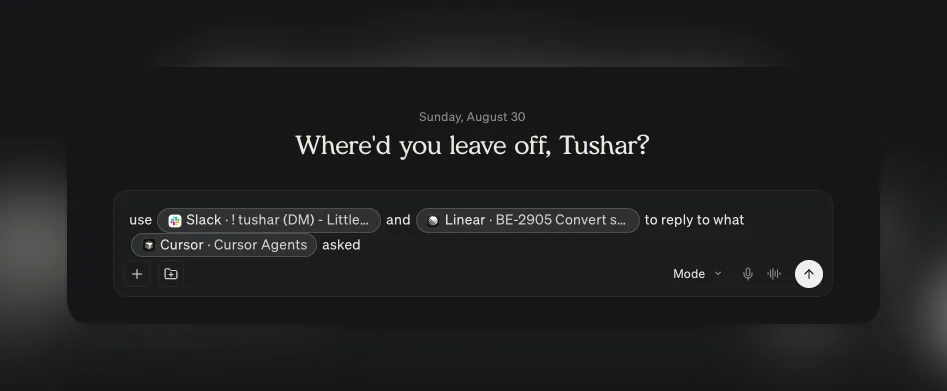
Type @ in the composer and choose a window, and Littlebird reads it for that message. The menu lists what you have open with each window’s title beside the app, so you are handing over the tab or the file you mean rather than the app in general.
It is at its best when the thing you need help with is already in front of you. Tag your browser on a long article and ask whether it changes anything for your plan. Tag your editor and ask for the pull request description. Tag a spreadsheet and ask for three lines you can say out loud on a call. Tag Slack and ask for a reply that pushes the date a week without sounding like it.
Name two and Littlebird holds them side by side — your design file and the spec it came from, and the question of which one is now out of date.
Apps you have excluded from context sit in their own Attach an excluded app section. A mention is a one-off share rather than a standing permission, so you can hand over one window once without letting Littlebird watch that app at all. Hover takes @ too. Available on macOS.
#9799#9664#9619#9661Send the summary to the attendees
A meeting summary is written for you. It carries a private For you section and phrasing that only makes sense to whoever took the notes, so forwarding one has never been a good idea.
Send to attendees rewrites it for other readers. Littlebird drops your private section, recasts the summary for a group, and opens an email draft addressed to the other people on the invite.
Nothing sends on its own. Read the draft, change what you want, and send it from your own connected Gmail account, so replies come back to you rather than to Littlebird.
#9357#9464#9489#9598Improvements
- Integrations
Zoho CRM is in Add integrations.
#8822 - Integrations
Improved how Littlebird uses your connected integrations, so it checks your email, calendar, Slack, or ticket tracker for an answer instead of relying on what happens to be on your screen.
#9654 - Artifacts
Everything Littlebird builds for you gathers on the Artifacts page. Search by the artifact’s name or by the chat it came from, filter by type, switch between a grid and a list, and open, refine, download, share, or delete any of them from its menu.
#9738#9590#9761#9763 - Artifacts
A markdown artifact has a copy button in its side panel that puts the whole document on your clipboard, and the Artifacts page notes that building one can use more of your monthly usage than an ordinary chat.
#9612#9685 - Command bar
Settings has a search box that finds a setting across every section and jumps to the exact row, typos included. It reaches your connected accounts, MCP servers, keyboard shortcuts, and archived chats, and individual settings turn up in the command bar.
#9587#9599#9603 - Hover
Ctrl+E moves the Hover conversation you are in into the main window, without opening the actions menu.
#9783 - Hover
The Hover overlay has a larger area to drag by, its composer has more room, and each item in the rail can remove its own chat.
#9715#9691 - Meeting
Meeting notifications are more compact, and the logo on one is the app you are actually about to join — Zoom, Teams, or Meet — rather than a guess from the event name.
#9703 - Routines
Search finds what your Routines produced. A matching run appears under a Routines heading and opens the Routine rather than a chat, and Routine runs stay out of your chat list.
#9564 - Chat
The artifact panel can no longer squeeze a chat down to nothing. Chat keeps a minimum width, and side panels float over it when the window is narrow.
#9588 - Usage
Invite links are shorter, you can copy the link itself rather than only the code, and the share text is written for the place you are posting it. Let Littlebird write it opens a chat that drafts the invite from how you actually use Littlebird.
#9584#9589 - Mobile
A new-chat button sits in the chat header, so starting one no longer means opening the drawer.
#9719 - Mobile
Tapping the Littlebird wordmark at the top of the drawer takes you home.
#9605 - Mobile
You can edit a Routine’s instructions from the phone, not only its name, schedule, and notifications.
#9651
Fixes
- Chat
Fixed the view jumping upward for a moment when you send a message in a long chat.
#9636 - Chat
Fixed a project showing none of its chat history.
#9810 - Chat
Fixed images attached to a shared chat failing to load for the people you shared it with.
#9746 - Chat
Fixed a generic error appearing when you stop a reply and immediately start another.
#9784 - Chat
Fixed a reply failing when it produced an image partway through the answer.
#9692 - Chat
Fixed an answer looking as though it were missing when the reply ended by writing a to-do list.
#9786 - Chat
Fixed a subagent’s activity being listed twice while Littlebird was working.
#9694 - Artifacts
Fixed a long answer losing the file it had already built, or handing it over twice.
#9855#9829 - Artifacts
Fixed a report running edge to edge, and overshooting its own layout, in a full-screen artifact panel.
#9634 - Hover
Fixed pressing Enter while Littlebird was still working sending a second message into the same turn.
#9596#9789 - Hover
Fixed Hover missing a reply that finished while its window was hidden.
#9779 - Hover
Fixed a chat started from Hover losing the project you were in.
#9668 - Hover
Esc closes the Hover window rather than starting a new chat, and the window closes again when you click outside it.
#9754#9625 - Hover
Fixed the macOS login window being offered as context.
#9660 - Meeting
Fixed a meeting-prep notification not opening the prep it was announcing.
#9704 - Meeting
Fixed the expanded composer not appearing when you start a chat from Meeting Notes.
#9760 - Meeting
Fixed a long meeting name failing to save.
#9693 - Meeting
Fixed the menu bar calendar returning after you turned it off.
#9585 - Meeting
Fixed duplicate requests to remove a calendar event.
#9752 - Routines
Fixed opening a Routine from the sidebar showing the run you read last rather than the newest one.
#9642 - Routines
Fixed a long Routine title failing to save.
#9702 - Routines
Fixed a report card giving up before its report was ready.
#9641 - macOS
Fixed Littlebird asking you to turn on Google Docs screen reader support when it was already on.
#9689 - Mobile
Fixed the Usage screen counting your monthly allowance as credit you had bought.
#9676 - Mobile
Fixed the composer covering the last chat or note on a project screen.
#9606